Scrib Desktop is the Windows companion to the Scrib encrypted notes app: a tabbed text editor that encrypts files with AES-256, handles plain text and rich text, and works fully offline with no account and no tracking. The last release post covered 1.7.0 and its locked tabs.
This release adds nothing. It exists because a full review of the code found two ways the editor could lose your work without telling you.
Both bugs had been there since the first release. Neither ever showed an error. That is the part worth writing about, and it is not specific to Scrib: the dangerous failures in a text editor are not the crashes. They are the saves that report success.
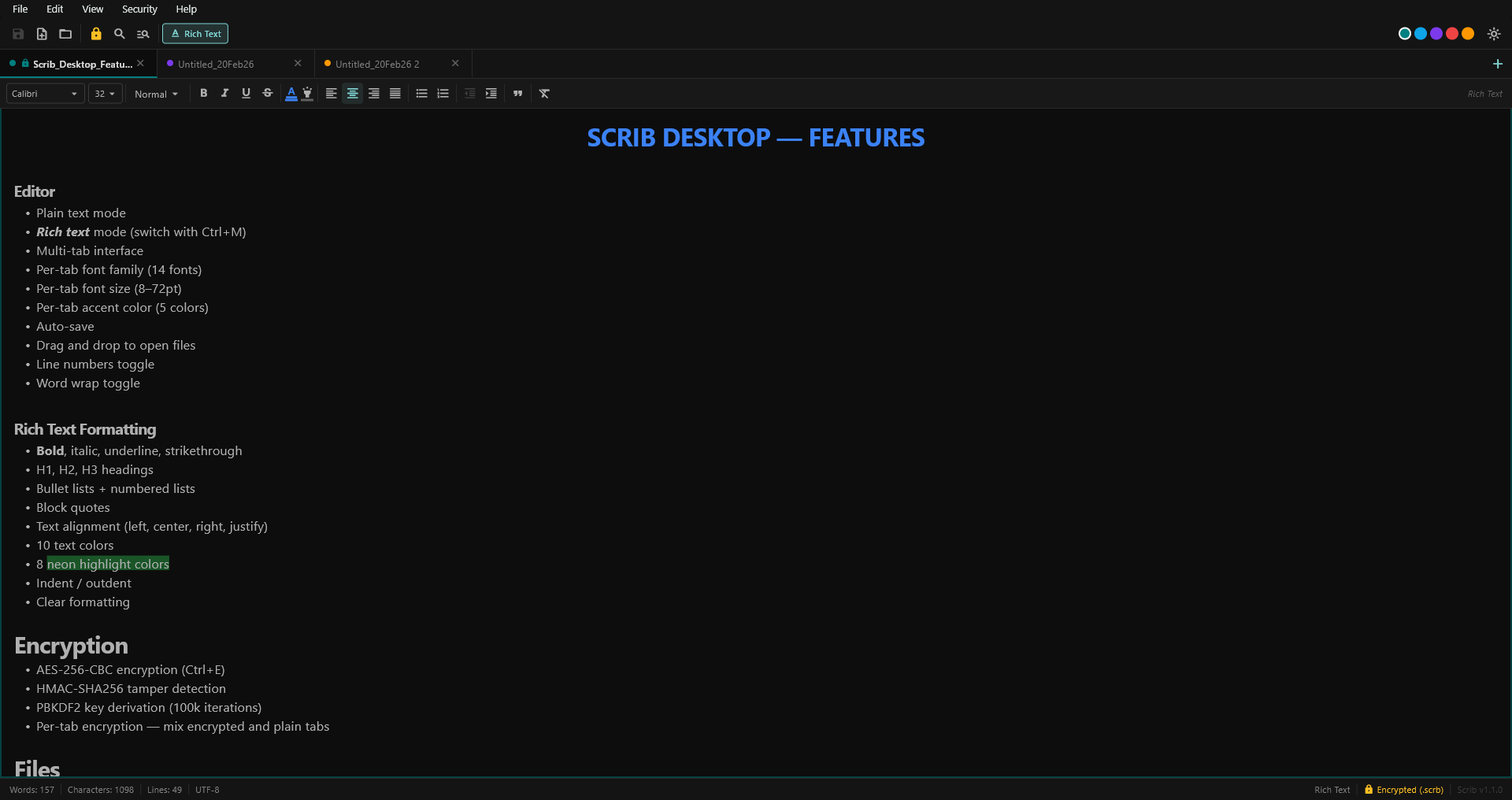
Scrib Desktop. A multi-tab encrypted editor for Windows, free and open source under GPL-3.0.
The first bug: text typed during a save was thrown away
Scrib saves in the background. Auto-save runs every 30 seconds, and there are save paths on close and on quit. A save is not instant, and an encrypted save is considerably slower than a plain one: it derives a key with PBKDF2-SHA256 at 100,000 iterations, encrypts, computes an HMAC, and writes the file atomically. Well over a tenth of a second, every time.
Here is what went wrong in that window. When the write finished, Scrib marked the tab clean by comparing it against the tab's current content, not against the bytes it had actually just written. So anything you typed during the write was recorded as already saved. The dirty marker cleared. The close prompt saw nothing pending. Quit, and the sentence was gone, with the editor having reported a successful save the whole time.
The fix is a snapshot. A save now captures exactly the content it is about to write, and when the write completes it marks the tab clean against that, not against whatever is on screen a quarter of a second later. Text typed during the write no longer matches, so the tab stays unsaved and the next save picks it up. The regression test for this types into the tab from inside the file-write call, which is the only way to reproduce it reliably.
The second bug: encrypting a file could destroy a different one
Ctrl+E does not only encrypt. It changes the file's extension: notes.txt becomes notes.scrb. The plain and rich text toggle does the same thing between .txt and .rtf.
Before 1.10.0, that new path was written with no questions asked. If a notes.scrb already existed at the destination, from an earlier encrypted note, a backup, anything at all, it was replaced. Then the .txt source was deleted. Two files in, one file out, no prompt, no backup, no undo.
Now any save that changes a file's extension asks before replacing an existing file. And if that prompt cannot be shown, which is the case for a background save, the save declines rather than guessing. That is the general rule this release settled on: a refused save leaves the tab unsaved and says so. An editor that reports success for a write it did not perform is worse than one that fails loudly.
Two smaller versions of the same problem went with it. Save As now refuses a file another tab already has open, which previously left the two tabs overwriting each other. And naming an untitled tab asks before replacing an existing file.
Files another program changed are no longer overwritten
Leave a note open in Scrib. Edit the same file in another program, or let a sync client pull down a newer copy from another machine. Before 1.10.0, the next auto-save replaced it, silently.
Scrib now records a file's modification time and size when it reads or writes it, and checks them before writing again. If the file changed underneath, a background save refuses and leaves the tab unsaved; a manual save asks first. This matters most if your notes live in OneDrive, Dropbox, Syncthing, or any folder something else writes to.
How do I know if my own editor has this problem?
You can check any editor in about thirty seconds, and it is worth doing on whatever you actually write in:
- Open a text file in your editor and leave it open.
- Open the same file in Notepad, add a line, save, and close Notepad.
- Back in your editor, type one character and save.
- Open the file in Notepad again.
If the line you added in Notepad is gone and nothing warned you, your editor overwrote an external change without asking. Editors that handle this show a "file has changed on disk" prompt at step 3. Scrib Desktop did not, until this release. Neither does Windows Notepad itself.
The plaintext an encrypt used to leave behind
Press Ctrl+E on notes.txt and Scrib writes notes.scrb, then removes the original. It has removed the original since 1.4.0, which is what most people assume "encrypt this file" means.
But deleting a file on Windows only unlinks it. The bytes stay on the disk until something else claims that space, and ordinary undelete tools read them back. So a note you encrypted last month could still be sitting there in plaintext. 1.10.0 overwrites the original's bytes before removing it, and does the same to any stray backup file an interrupted save left behind.
The honest limit, which is also in the README threat model: overwriting is best effort by nature. On an SSD, the controller may write your overwrite to a fresh block and leave the original one intact until it gets around to erasing it. A backup, a filesystem snapshot, or a synced folder can hold a copy Scrib never sees. If a note must never exist in plaintext, create it encrypted rather than converting one.
The rest of the security work
- Locking a tab clears more.
Ctrl+Lnow also clears the tab's undo history, the decoded images held in memory, and the clipboard when it holds text copied from that note. The undo stack used to keep the decrypted text after the lock screen went up. - A note cannot be locked over a plaintext file. Marking a
.txtas encrypted and then locking it used to show a lock screen over a file that was not encrypted, and that could never be unlocked. - Change Password fails cleanly. If the re-encrypt failed, the interface said so while the app quietly kept the new password and used it on the next save. The password now commits only after the write succeeds.
Ctrl+clickshows a link's real destination before opening it, and a link Scrib blocks now says so instead of doing nothing.- The password strength meter got stricter. It now accounts for common passwords, keyboard runs, and repeated characters, so some passwords it used to call Strong rate lower. That is the meter getting more honest, not your password getting weaker.
- Hostile files are bounded. Reads are capped at 64 MB, and crafted
.rtf, table, and image payloads can no longer hang the app or exhaust memory. Opening a note someone sent you means parsing untrusted input, and there is no sandbox around that parsing.
Rich text, search, and the rest
- Colored and highlighted text no longer gains a stray space on every save to RTF, and the colors are now exported instead of dropped.
- Table cell edits are no longer lost when a tab closes mid-edit, and copying a table no longer sends edits to the wrong copy.
- Whole-word search no longer skips matches that follow a rejected candidate, and it now recognizes accented and non-Latin words. Replace All used to corrupt them.
- Text files that are not valid UTF-8, the sort of
.logand.csvand.iniolder Windows tools produce, now open instead of being refused. - Clearing recent files and turning off session restore now remove the stored note paths from disk. The settings database appends rather than rewrites, so the earlier entries used to stay readable in the file after you cleared them.
- Launching a second copy of Scrib explains that one is already running instead of exiting invisibly.
How these were found, including one the review itself created
1.10.0 came out of two passes over the code: a review split across subsystems, then an adversarial security pass whose only job was to attack the first pass's work.
The second pass paid for itself immediately. The fix for the mid-save bug, the one that records what was written, had introduced a new problem of its own. If a tab was locked while its save was still in flight, the completion step put the decrypted text back into the locked tab and pinned it unsaveable. The older, less correct code had avoided that by accident. It was caught, reproduced as a failing test, and fixed before the release went out.
Every data-loss and security fix above was written the same way: a test that fails against 1.9.0 first, then the fix. The suite grew from 518 tests to 613, 95 of them new in this release. The full list is in the CHANGELOG.
Your files are safe, and there is still no installer
The .scrb file format and your settings are unchanged in 1.10.0. Every existing encrypted file opens with the same password, and a file saved by 1.10.0 opens in 1.3.0 or later. Scrib Desktop ships as a portable zip, not an installer, so nothing touches your registry or system folders. Updating means extracting the new folder over the old one.
Download and verify
- Download
scrib-desktop-v1.10.0-windows-x64.zip(direct link, about 13 MB). - Extract it anywhere.
- Run
scrib_desktop.exe.
Windows may warn about an unsigned app. Choose More info, then Run anyway. The build is not code-signed. That is a real gap, and not one I want to gloss over.
What is new in 1.10.0 is that each release now publishes a build provenance attestation, so you can tie the zip you downloaded to the public workflow run and commit that produced it:
gh attestation verify scrib-desktop-v1.10.0-windows-x64.zip --repo beeswaxpat/scrib-desktopThat needs the GitHub CLI, and it is a stronger check than the published SHA-256 file. The checksum is generated by the same workflow that builds the zip, so it proves the download was not corrupted in transit and nothing more. Earlier wording on this site and in the README implied more than that; the README now states it plainly. The release page and the full source are on GitHub, and issues and pull requests are welcome.
Questions
Should I update to Scrib Desktop 1.10.0?
Yes, if you use Scrib Desktop. Two of the fixes address silent data loss during ordinary editing: text typed while a save was in progress was recorded as saved without reaching disk, and a save that changed a file's extension could replace a different file. The .scrb format and settings schema are unchanged, so updating means extracting the new zip over the old folder. Your files and preferences are untouched.
Can I lose text I type while an editor is saving?
It depends on how the editor decides a file is saved. A save is not instant, and an encrypted save is slower still. If the editor marks the document clean by comparing it against the document's live state when the write finishes, anything typed during the write is recorded as saved without ever being written. Scrib Desktop had that defect until 1.10.0. A save now records exactly the content it wrote, so a document edited mid-write stays unsaved and the next save picks it up.
Will my existing .scrb files still open after updating to 1.10.0?
Yes. The .scrb file format and the settings schema are unchanged in 1.10.0. Every existing encrypted file opens with the same password, and files written by 1.10.0 open in 1.3.0 and later.
Does Scrib Desktop warn me if another program changed the file?
Yes, since 1.10.0. If the file changed on disk while the note was open, a background save refuses and leaves the tab unsaved, and a manual save asks before replacing the newer file. Earlier versions replaced it with no warning, which mattered most for notes kept in a synced folder such as OneDrive or Dropbox.
Does encrypting a file with Ctrl+E remove the plaintext original?
Since 1.4.0 the original is deleted. Since 1.10.0 its bytes are overwritten before it is removed, along with any stray backup left by an interrupted save. Deleting a file on Windows only unlinks it, so before 1.10.0 the plaintext remained readable in free space. Overwriting is best effort by nature: on an SSD the controller may write the overwrite elsewhere, and a backup, filesystem snapshot, or synced folder can hold a copy Scrib never sees. For a note that must never exist in plaintext, create it encrypted rather than converting one.
Is the Scrib Desktop download code-signed, and how do I verify it?
It is not code-signed, so Windows shows an unsigned-app warning. Since 1.10.0 each release publishes a build provenance attestation, so the zip can be traced to the public workflow and commit that built it: run gh attestation verify scrib-desktop-v1.10.0-windows-x64.zip --repo beeswaxpat/scrib-desktop with the GitHub CLI. The published SHA-256 is generated by the same workflow that builds the zip, so it detects transfer corruption but is not evidence of authenticity.
Keep Reading
- Scrib Desktop 1.7.0. Lock Encrypted Notes Without Closing Them: locked tabs, idle auto-lock, and session restore that reopens encrypted notes locked.
- Encrypted Notepad for Windows: What Actually Works: Notepad has no password feature, and here is what does.
- 5 Best Private Notes Apps for Windows, Compared: Scrib Desktop against Joplin, Standard Notes, Obsidian, and Notesnook.
- Scrib Desktop Is Now Open Source: how the encryption is built, with the source.
- Notes App Encryption at Rest: What It Protects and What It Does Not: the honest version of what AES-256 buys you.
Scrib on Android
Looking for encrypted notes on your phone? Scrib for Android has AES-256 encryption, PIN lock, Private Vault, and works completely offline. No account required.