Scrib is a free encrypted notes app for Android: AES-256 on the device, no account, no cloud, no tracking. Version 3.1.0 went live on Google Play on August 30, 2026, adding folders, note import from Google Keep, Simplenote, Evernote, and plain text or Markdown files, per-note text colors, and checklists that mix with regular text in the same note.
Play users are updating from 2.2.1. The three versions in between were internal test builds that never shipped, so this one update carries four releases' worth of changes. Version 3.1.1 was submitted to Play review the same evening and replaces 3.1.0 automatically once approved; the cursor fix below is what it carries.
The reviews wrote this release
Almost none of this was my idea.
On August 1, a reviewer asked for two things: individual folders, and "a way to import notes from apps like Google Keep". On August 24, Robert wrote that he was migrating from another notepad app with 400+ files he did not want to retype, and pointed out that since Scrib already exports to .txt, it should import from it too. He was right. I replied to both promising the features, and this release is those promises kept: the folders request shipped 29 days after it was made, and Robert's import request shipped in 6.
The cursor complaints go back further, and they were the most deserved. In June, a reviewer described trying to place the cursor and having the app start selecting text "with every touch", adding that backing out to escape it meant "there's a chance to lose the thought". Andrew filed the clearest report on August 3: on Android 16, moving the cursor made the app "freak out from this gesture" and highlight everything, and canceling it was nearly impossible. Guillaume hit the same wall on August 13 wanting to continue a sentence in an existing note. And back in July, someone uninstalled over it, which I understand. The 2.2.1 release post said plainly that this bug was not fixed yet. It is now, in 3.1.1, and the fix section below explains what was actually wrong.
Scrib has no analytics, so reviews are the only telemetry I get. If you write one, I read it, and apparently I also build it.
Folders, with an off switch
Notes can now be grouped into folders, and the folder row at the top of the list filters with one tap. Deleting a folder never deletes the notes inside it; they just return to the main list. Search matches folder names too, so typing "work" surfaces the Work folder above the note results and jumps you into it.
If you liked Scrib as one flat list, the feature has an off switch: Settings, then Appearance, then Show folders. Off means hidden, not deleted. Every assignment is kept, and turning folders back on restores them exactly as they were.
Import: bring your notes with you
Settings, then Import notes. Pick files or a whole zip archive, and Scrib reads plain text, Markdown, Google Keep exports, Simplenote exports, and Evernote .enex files. For Keep, you can feed it the Google Takeout zip directly, and a Keep note's color is even mapped to the closest Scrib color on the way in.
Duplicates are skipped automatically, so importing the same export twice never doubles your notes. When it finishes, it reports exactly what happened: how many notes were imported, how many duplicates were skipped, and how many files it could not read. It reads your export files and writes notes; it never changes or deletes the files you imported from.
Robert's 400 text files were the sizing target here. A migration that size is exactly the case the zip support and the duplicate skipping exist for.
If Google Keep is what you are leaving, I keep an honest audit of what Keep does and does not protect. Short version: Google holds the keys.
Checklists that mix with regular text
Tap the list button in the editor and choose Checklist, and the line your cursor is on becomes a checkbox item. Enter gives you the next box. Enter on an empty box ends the list and returns to plain text.
Because the list is made of lines rather than the whole note, a checklist can sit in the middle of ordinary writing: meeting notes above, action items in boxes below, a closing thought underneath. In the reading view, tapping a box checks it off with a strikethrough, without opening the editor. Bullet lists work the same way from the same menu, and converting between the two keeps your text.
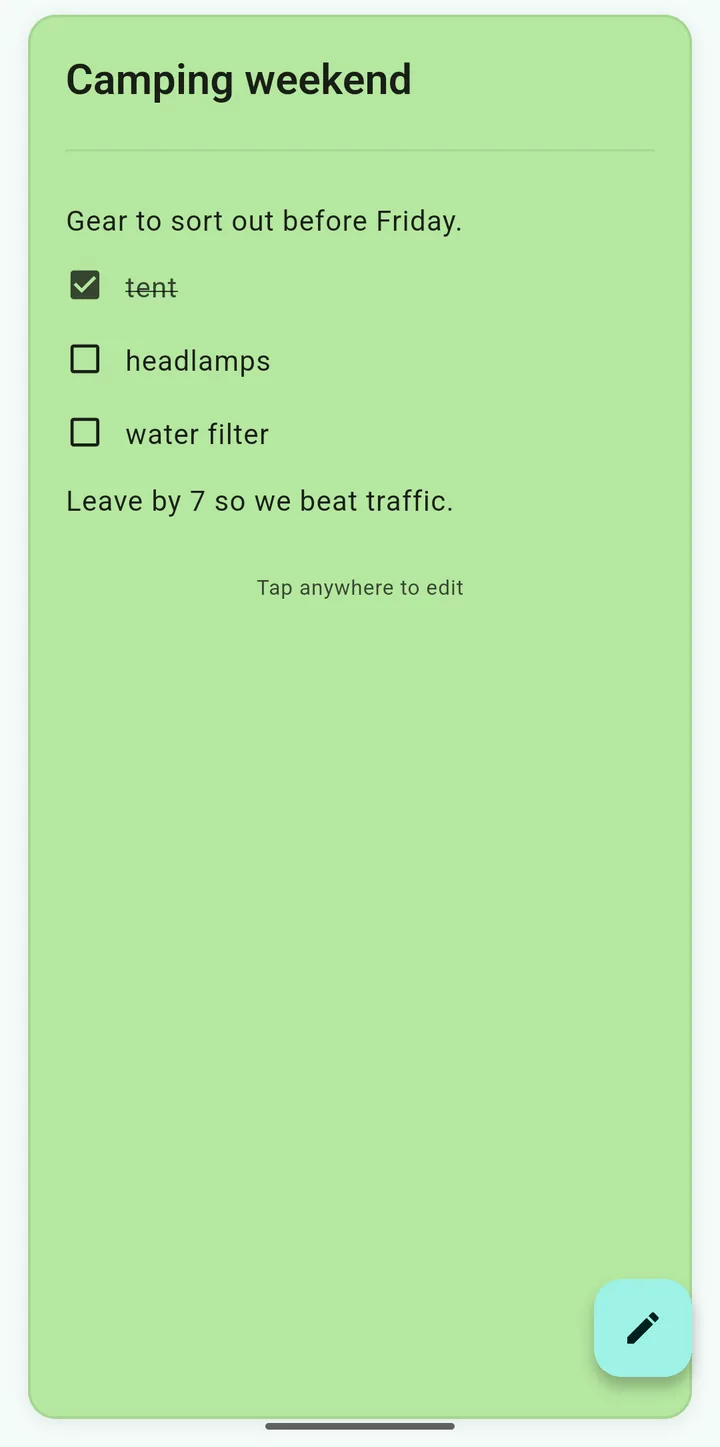
A checklist in the middle of a note, on the Mint Green card color. The checked item came from one tap in the reading view.
The first version of this feature converted the entire note into a checklist, all or nothing. A day of using it on my own notes made the problem obvious, and that build never left internal testing. The version that shipped works line by line, which is what a checklist inside real notes has to be.
Text colors, and a bigger palette
Any note can now have its own text color: title and body together, or body only. You pick a hue once, and Scrib chooses the exact shade per theme so it stays readable in both light and dark mode. If a color cannot clear the contrast bar on a given background, Scrib falls back to the automatic foreground rather than drawing something you cannot read.
The palettes grew alongside: 44 note colors and 16 accent colors, up from 40 and 12. The rule from 2.2.1 still holds for every addition: all 44 clear the WCAG AA contrast bar of 4.5:1 for the text drawn on them, with the closest at 4.77:1, and text on each color picks light or dark by measurement, not by guess.
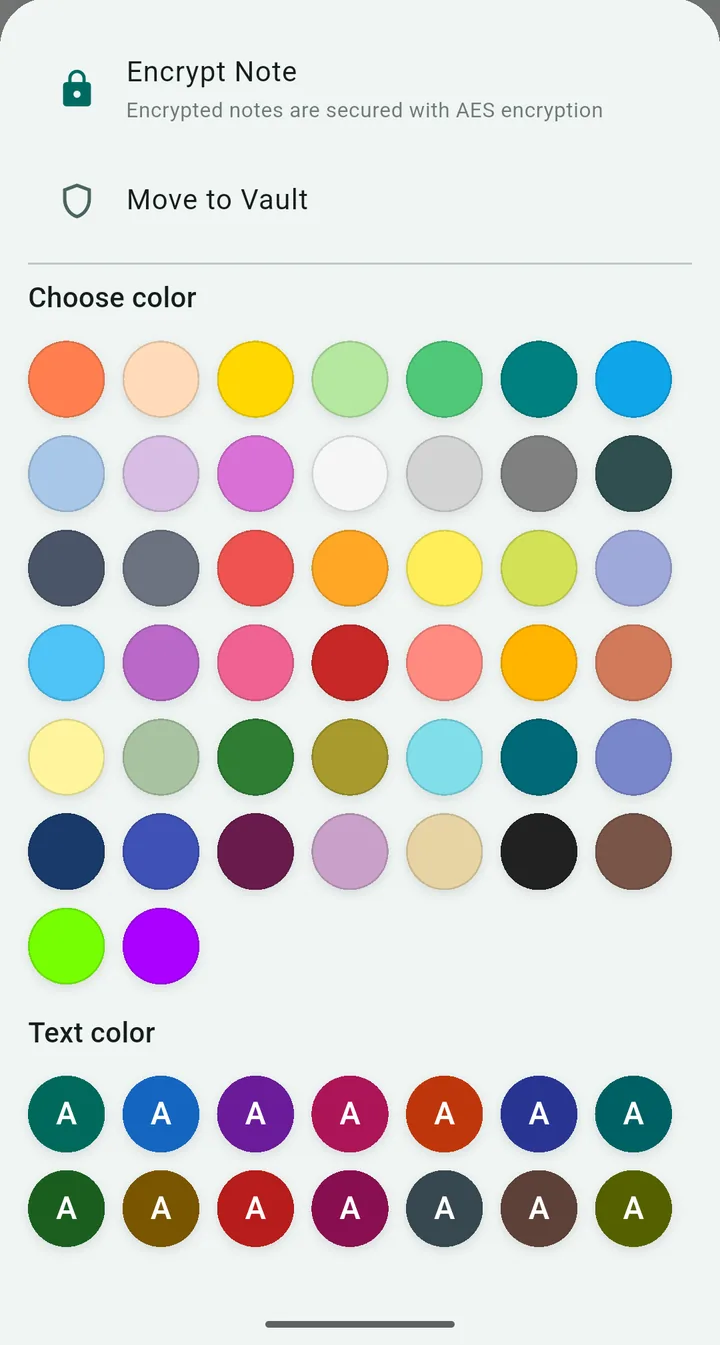
One sheet, both choices: 44 background colors, and a text color per note tuned to the theme.
The cursor bug is fixed in 3.1.1
Here is what was actually wrong. Scrib opens a note in a reading view, and that view drew the text with a component whose entire job is text selection. So it treated every tap as the start of a selection: tap a word to put the cursor there, and instead the app began highlighting, and kept highlighting with each new tap. The only reliable exit was tapping empty space at the bottom. Four reviews described it, in English, French, and German, and they were all describing the same component.
In 3.1.1, tapping any spot in a note starts editing with the cursor at that exact character. Tap the middle of a word, the cursor lands in the middle of that word. Tap past the end of a short line, it lands at the end of that line. Tap the title, you edit the title. Tap the empty space below the text, the cursor goes to the end of the note. A long press does the same instead of trapping you in a selection, and checklist boxes still toggle on tap.
One thing moved on purpose: copying text from the reading view. Selection now lives in the editor, one tap deeper, because handing every tap to editing is the entire fix. The exception is a note Scrib refuses to edit, such as one it could not fully decrypt: there the old selectable view stays, so copying text out always remains possible.
3.1.0 shipped without this fix; 3.1.1 carries it and was submitted to Play review the evening of August 30. Updates land automatically once it is approved, so if the About section of Scrib's Play page shows 3.1.1 or later, this is fixed on your phone.
What did not change
The note storage format. The update does not rewrite, convert, or migrate your notes; a checklist is stored as the plain text you can see, so exports read the same and nothing new can fail. Your PIN is untouched. And Scrib still has no account, no cloud, no analytics, and no network permissions, so the import runs entirely on your device, like everything else.
Common Questions
How do I import notes from Google Keep into Scrib?
Export Keep through Google Takeout at takeout.google.com, selecting only Keep to keep the file small. Takeout gives you a zip; move it to your phone if you exported on a computer. In Scrib, open Settings, tap Import notes, and pick the zip. Scrib reads the notes out of it, maps each Keep color to the closest Scrib color, and skips any note it already has.
Does deleting a folder delete the notes inside it?
No, never. Deleting a folder removes only the folder; every note in it returns to the main list. Turning the folders feature off in Settings does not delete anything either, since it hides the folder row and keeps every assignment for when you turn it back on.
Can a checklist and regular text share one note?
Yes. Checklists in Scrib work line by line, so checkbox items can sit above, below, or between paragraphs of ordinary text in the same note. Toggling Checklist in the editor converts only the line the cursor is on, and pressing Enter on an empty checkbox ends the list.
When do I get the cursor fix?
It is in version 3.1.1, which was submitted to Google Play review on August 30, 2026 and rolls out automatically once approved. Play usually delivers updates within a few days. Version 3.1.0 carries every other change; only the cursor fix rides in 3.1.1.
Is Scrib still free, offline, and account-free?
Yes. Scrib 3 is free with no ads and no purchases, has no accounts and no cloud sync, and holds zero network permissions, so notes physically cannot leave the device. Every note is encrypted with AES-256 using a key stored in the Android Keystore.
Keep Reading
- Best Private Notes Apps for Android: an honest comparison, Scrib included.
- Scrib 2.2.1: Missing Notes Come Back: the release before this one, and the recovery that made updates safe.
- Is Google Keep Secure?: what Google can read, and why Keep has no note lock.
- Can You Password Protect Google Keep Notes?: no, and the workarounds ranked honestly.
- Notes App Encryption at Rest: encrypted at rest vs end-to-end, and which one your app has.
Scrib 3 for Android
Free, AES-256 encrypted notes with folders, import, checklists, and a Private Vault, fully offline. No account, no tracking, and your reviews steer the roadmap.